
Previous post covered the network — VLANs, isolated 10G storage, firewall policy. This post covers what runs on top of it: Ceph, managed by Rook-Ceph.
Why Ceph
There are several ways to handle storage for this cluster, and Ceph wasn’t the only option.
The simplest approach: keep the Synology NAS for file shares and run Longhorn inside the cluster for block storage. Or go with a dedicated TrueNAS box — it handles block (iSCSI), file (NFS/SMB), and object (MinIO S3) from one appliance. Both are valid, plenty of homelabs work this way.
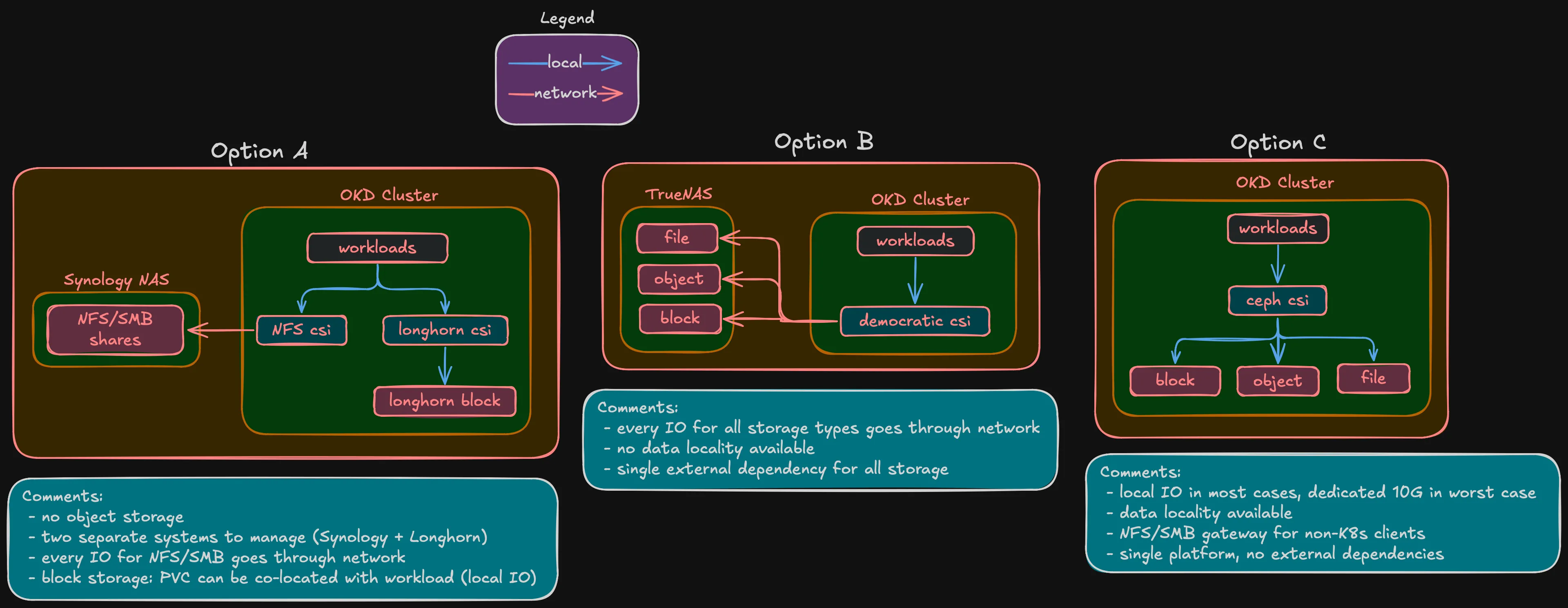
But this is a hyperconverged build. The whole point of HCI is that compute, storage, and networking run on the same nodes. With external storage — whether Synology, TrueNAS, or anything else — almost every I/O from a pod crosses the network to a separate box and back. That’s a bottleneck, especially for latency-sensitive workloads like databases. With Ceph on the same nodes, the primary OSD for a PVC can live on the same node as the pod. I/O stays local or crosses one 10G hop at worst.
Ceph fits the HCI model — data distributed across the same nodes that run workloads, replicated by failure domain, self-healing. Rook-Ceph manages it as a Kubernetes operator, same lifecycle as everything else on the platform.
Ceph vs Longhorn
Longhorn is the other common Kubernetes-native storage option. Here’s where they differ:
| Ceph (Rook) | Longhorn | |
|---|---|---|
| Block storage | RBD (kernel driver) | iSCSI (V1) / NVMe-oF (V2 preview) |
| Shared filesystem (RWX) | CephFS | NFS pod per volume (workaround) |
| Object storage (S3) | RGW | Not supported |
| NFS/SMB gateway | NFS-Ganesha + Samba | Not supported |
| Erasure coding | Full support | Not supported |
| RAM overhead (3 nodes) | ~12-18 GB | ~1-2 GB |
| CNCF status | Graduated | Sandbox |
Longhorn is simpler and lighter. But it only does block storage — no filesystem, no object, no erasure coding. For a project that needs all three storage types plus efficient capacity usage, it’s not enough.
And there’s the experience angle. I work with OpenShift daily, but at the platform level — I never touch the Ceph layer underneath. Building Rook-Ceph from scratch means understanding CRUSH maps, OSD lifecycle, PG management, erasure coding profiles — the internals that managed Ceph abstracts away. That knowledge directly benefits my professional work.
Three tiers per node
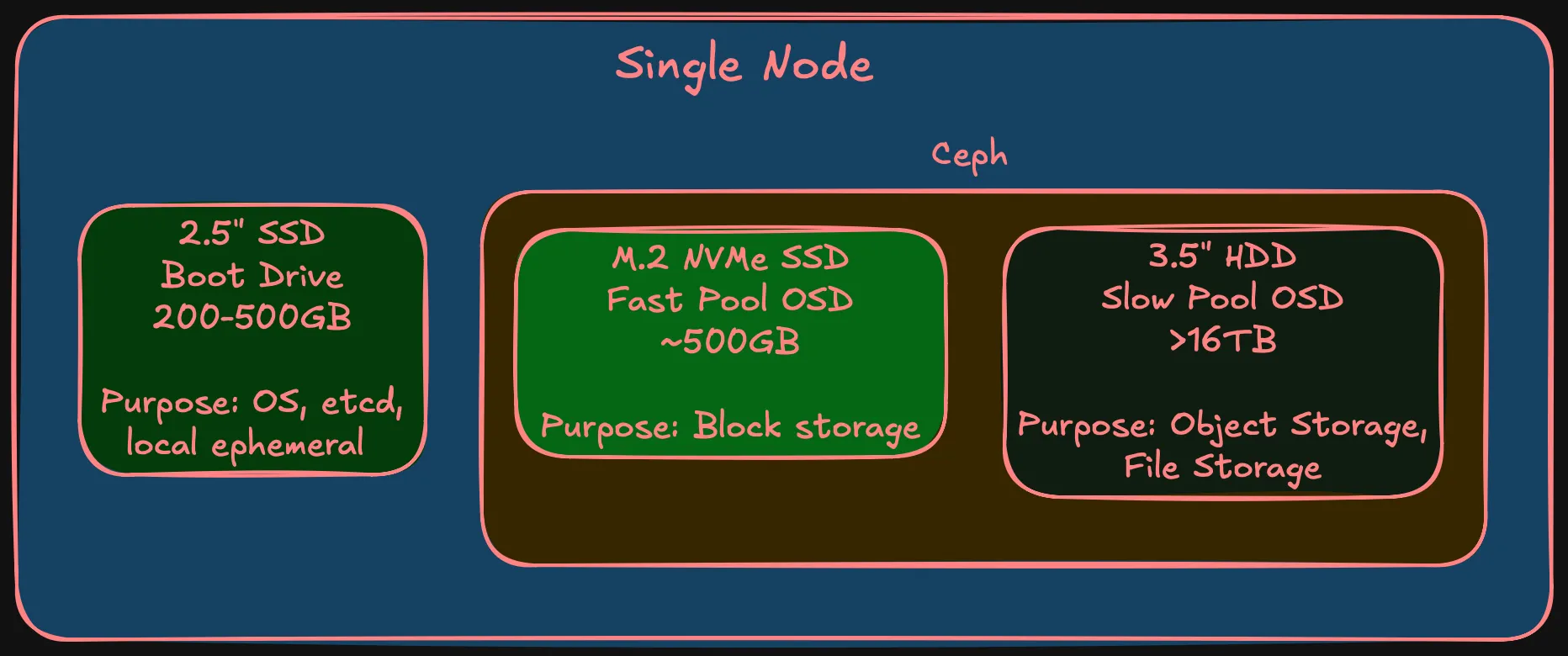
Each node has three storage devices:
| Tier | Media | Capacity | Purpose | Part of Ceph? |
|---|---|---|---|---|
| Boot | 2.5” SSD | 200-500 GB | SCOS, etcd, local ephemeral | No |
| Fast OSD | M.2 NVMe | ~500 GB | Block storage (databases, VMs) | Yes — fast pool |
| Slow OSD | 3.5” HDD | 16+ TB | Object, filesystem, backups | Yes — slow pool |
Warning (Boot drive endurance)
The boot drive has a specific requirement: high write endurance. etcd fsyncs on every Kubernetes API change — consumer SSDs with low TBW will wear out. Enterprise-grade endurance is required. Specific model is a BOM decision.
Two pools, two strategies
A database needs sub-millisecond latency. A media archive needs capacity. Mixing NVMe and HDD in one pool means Ceph might place a hot replica on spinning rust — 0.1ms becomes 10ms. Two pools, pinned to device classes via CRUSH rules.
Fast pool (NVMe) — replication-3
Three copies, one per failure domain. Simple, works cleanly with RBD. EC on NVMe isn’t worth it — small pool, minimal space savings, adds CPU overhead.
| Phase | Raw | Usable (rep-3) |
|---|---|---|
| Phase 1 (3 nodes) | 1.5 TB | ~500 GB |
| Phase 2 (5 nodes) | 2.5 TB | ~833 GB |
Not a lot, but block storage for databases and VMs doesn’t need terabytes.
Slow pool (HDD) — erasure coding
This is where the interesting decision is. The slow pool has the most raw capacity and benefits most from efficient replication.
Phase 1 (3 nodes) — two options:
| Strategy | Usable | Overhead | Failures tolerated | Recovery headroom |
|---|---|---|---|---|
| EC 2/1 | ~32 TB (67%) | 1.5x | 1 | None — no 4th node to rebuild on |
| Rep-3 | ~16 TB (33%) | 3.0x | 2 | Full — any 2 of 3 nodes can rebuild |
EC 2/1 doubles usable space but has no recovery headroom on exactly 3 nodes. If one node goes down, Ceph serves data fine but can’t rebuild the missing chunk. Second failure during that window = data loss. For media and backups that exist elsewhere, probably acceptable. For anything critical, it isn’t.
Note (Leaning EC 2/1)
The slow pool stores media, backups, and archives — data that can be re-obtained. But I haven’t committed yet and may change my mind during validation.
Phase 2 (5 nodes): EC 3/2 — 3 data + 2 parity. 60% usable, survives 2 failures.
| Phase | Strategy | Raw | Usable |
|---|---|---|---|
| Phase 1 (3 nodes) | EC 2/1 | 48+ TB | ~32 TB |
| Phase 1 (3 nodes) | Rep-3 | 48+ TB | ~16 TB |
| Phase 2 (5 nodes) | EC 3/2 | 80+ TB | ~48 TB |
Warning (EC migration)
EC profiles can’t be changed — can’t change after pool creation. EC 2/1 → EC 3/2 requires creating a new pool and migrating data. CephFS supports multi-pool layouts for this; RBD has live migration. Not trivial, but documented.
Ceph daemons
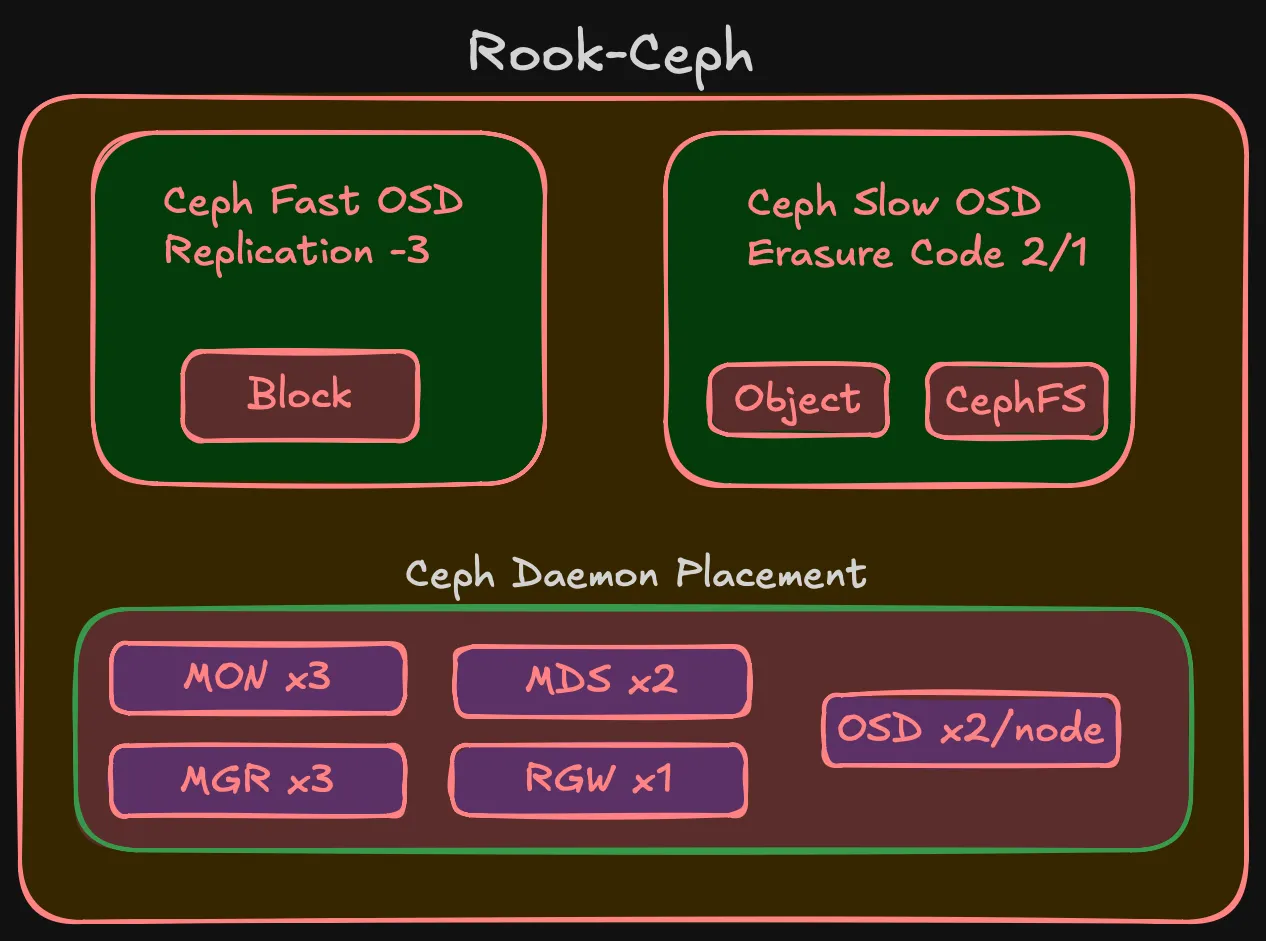
| Daemon | Count | Purpose | HA |
|---|---|---|---|
| MON | 3 | Cluster map, quorum | Survives 1 node loss |
| MGR | 2 | Metrics, dashboard | Active + standby |
| MDS | 2 | CephFS namespace | Active + standby |
| RGW | 1 | S3 endpoint | Scales later if needed |
| OSD | 2 per node | One NVMe + one HDD per node | Phase 1: 6, Phase 2: 10 |
StorageClasses
What workloads see:
| StorageClass | Ceph pool | Access mode | Use case |
|---|---|---|---|
ceph-block-fast | NVMe (rep-3) | RWO | Databases, VM disks |
ceph-filesystem | HDD (EC) | RWX | Shared filesystems |
ceph-object | HDD (EC) | S3 API | Backups, media, archives |
Workloads reference the StorageClass in their PVC. CRUSH rules, device classes, EC profiles — that’s infrastructure, not their problem.
What’s deferred
Note (Deferred decisions)
- Drive models and capacities — BOM post
- Boot drive endurance spec — BOM, real cost implications
- Final EC 2/1 vs rep-3 decision — can wait until deployment
- Rook-Ceph CRDs — implementation post
- EC migration procedure — Phase 2 implementation
- Ceph tuning — OSD memory, PG counts, scrub schedules. Day-2
Summary
Summary (Storage design at a glance)
- Ceph via Rook-Ceph — fits the HCI model, covers block + filesystem + object from one cluster
- Alternatives considered (Synology + Longhorn, TrueNAS) but don’t fit hyperconverged approach
- Hands-on Ceph experience directly benefits professional work
- Three tiers per node: boot SSD (local), fast NVMe (Ceph), slow HDD (Ceph)
- Fast pool: NVMe, rep-3, ~500 GB usable in Phase 1
- Slow pool: HDD, leaning EC 2/1 in Phase 1 (~32 TB), EC 3/2 in Phase 2 (~48 TB)
- NFS/SMB gateway available if I want to replace the Synology later
- Rook-Ceph as operator — CNCF Graduated, Kubernetes-native lifecycle
This is the last design subpost. Compute, network, and storage together define what the cluster needs. Next comes the BOM — where requirements become hardware with real prices.